Wednesday, November 12, 2014

TSplines Tips

TSplines is a powerful plug-in by Autodesk for Rhinoceros. It has a mammoth array of features, but I've noticed that it can create some really strange edge intersections. Here's a super quick guide to getting rid of non-manifold edges in TSplines before converting it back to a rhino surface. In this instance, I'm going be using TSPipe on some Grasshopper generated curves, then going from there.

1.) Look at this cool TSPipe. Unfortunately, it has some non-manifold edges. Enter TSEditMode to toggle editing by points. Bad edges will turn up red, notice the little red marks:


2.) We're going to fix these edges using the TSWeld command, click two red dots to get rid of them. If you have a few bad lines, you will have to reconnect both points before the bad points go away, so don't worry if you connect a pair and one is still there, it happens.

3.) To verify that we have a manifold model, enter TSToggleSmooth to change the model into a more circular shape, rather than a box shape. If it's successful, it means your model is watertight. Notice the less jagged appearance.
 In my experience, watertight models in TSplines won't necessarily yield models that will print. I've been using a Makerbot 2X to print these models with NO success. Though this is most likely due to the limited resolution of those printers, be warned. I haven't tried any that have been treated with these methods, so I will post back letting you all know how it goes.

Monday, November 3, 2014

Road to Pre-Customized Customization

As Bryan and I work towards the goal of "pre-customized" 3D modeling, that is, 3D modeling that can be quickly transformed to fit different shapes and sizes through Grasshopper definitions. My goal is by taking as little as 5 pre-cut wireframes from a 3D scan, the application of a Grasshopper definition will transform those wireframes into a full-on wearable object. We have not quite reached that point, but by supplementing our Grasshopper definitions with Autodesk's powerful TSplines plug-in, we have come up with some interesting results. Here is a quick step-by-step process:

1.) Start with wireframe obtained from scan. I do this by crafting flat surfaces where I want splits in my scan. Then I use the Split command in Rhino to get actually split these sections. Finally, using the DupBorder command, we can actually extract those wireframes, as this command is made to duplicate the border at the top of the surface.


2.) Loft those curves together. We need a surface to project the grid on, and lofting is an easy way to do that. You may also want to offset the curves before you do this. In my case, however, my measurements were rounded up a bit to begin with, so I found this unnecessary.
 3.) This grasshopper definition is applied. The output of the Pline is what will be baked.
 4.) Here is the hexagonal grid without it's corresponding surface. Now all we need to do is tsPipe these curves to get some cool results.

5.) Here's a nice render our finished bracelet. Settings for tsPipe depend on preference. I went with a quarter inch radius, a box output, and the bendy joint set.


Monday, October 6, 2014

Final Braclet Design

Had another go with TSplines and Grasshopper this afternoon. Here are the results, along with the process:


Here's my wire-frame that I will tsPipe out of existence.


 First attempt of the day. A bit boring for my tastes.


 That's more like it. This pipe includes added points to give it the vertical bars a diamond shape.


Again, I connected the bands with a cross-hatch pattern. This time there are more, I feel like the more there, the more support.

A quick render I did in Flamingo, just to give a sense of the whole object. I noticed upon rendering, that the cross-hatches were too thin, so I doubled their radii.
 
 
So fancy!


I plan on printed this in ABS, then giving the final print an Acetone vapor bath. This will yield a glorious, shiny wrist braclet!


Friday, October 3, 2014

Braclet Progress

This week, I've been busy rifling through the tutorials and videos on the awesome yet daunting Grasshopper plug-in for Rhino. Even better, I've been delving into some TSplines, notably: the tsPipe command. Thank you Autodesk for improving CAD software that you didn't even develop, am I right? Anyway, here's some progress I've made on the braclet. My idea is to make three separate bands that are connected by thin cross-hatches. Here's some shots:


An early tsPipe output.


 Final band design. I went with the a Diamond joint set and a radius of .02 (in).
 Here are the three together, now all we need to do is join them.
 Cross-hatches were HAND DRAWN IN, that was real fun.
 All together. Of course, I'm not satisfied. I think there should be more crosses, but less wide. They need to contrast the thickness of the band itself.


Saturday, December 21, 2013

I made a 3D Scanner... Cost: 0 Dollars

Using the popular Xbox Kinect hack, I have constructed a very component 3d scanner in my bedroom. All you need is a Kinect, a power adaptor for it, Skanect (trial version), and a chair that can rotate 360 degrees. Check out some of my first scans:


I have to work on better lighting situations, because the colored version makes me look like a zombie. But yeah, this stuff I really, really, really freaking cool. I already scanned my whole family! Only thing with the trail version is that you can't export STLs. However, you can upload your scans to sculpteo and have them printed. Though, printing anything over an inch on that site costs a fortune. 

http://www.sculpteo.com/en/design/dylan-sheppard/zvcfBXcT?uuid=NfQws6Jqy1dLOm12Mt0Ozh#tab=size

^ PRINT ME

Wednesday, December 18, 2013

3D Maze

Goes for sixty-something on Shapeways.

Renders!

So I decided tonight was the night to say screw it and try rendering in Flamingo, and damn was that a good idea! Here are my renders for the final project:


Yeah I modeled a bar if you didn't notice.
I definitely could've let the last two render longer but I was getting impatient. I also did a bit of post processing on each jpeg in photoshop to adjust the lighting and whatnot. 

Tuesday, December 17, 2013

Fashion Doll


She's called Quin, and has been cleverly sized to the proportions of today's fashion dolls so you can simply swab out the clothes. I think she looks beautiful, but expect a lawsuit from James Cameron.


Monday, December 16, 2013

3D Printing and Product Liability

Full article: http://www.3ders.org/articles/20131215-3d-printing-and-product-liability-you-may-not-be-protected-under-current-liability-law.html

New Mobile 3D Scanning App

Looks way more promising than 123D...

Wednesday, November 27, 2013

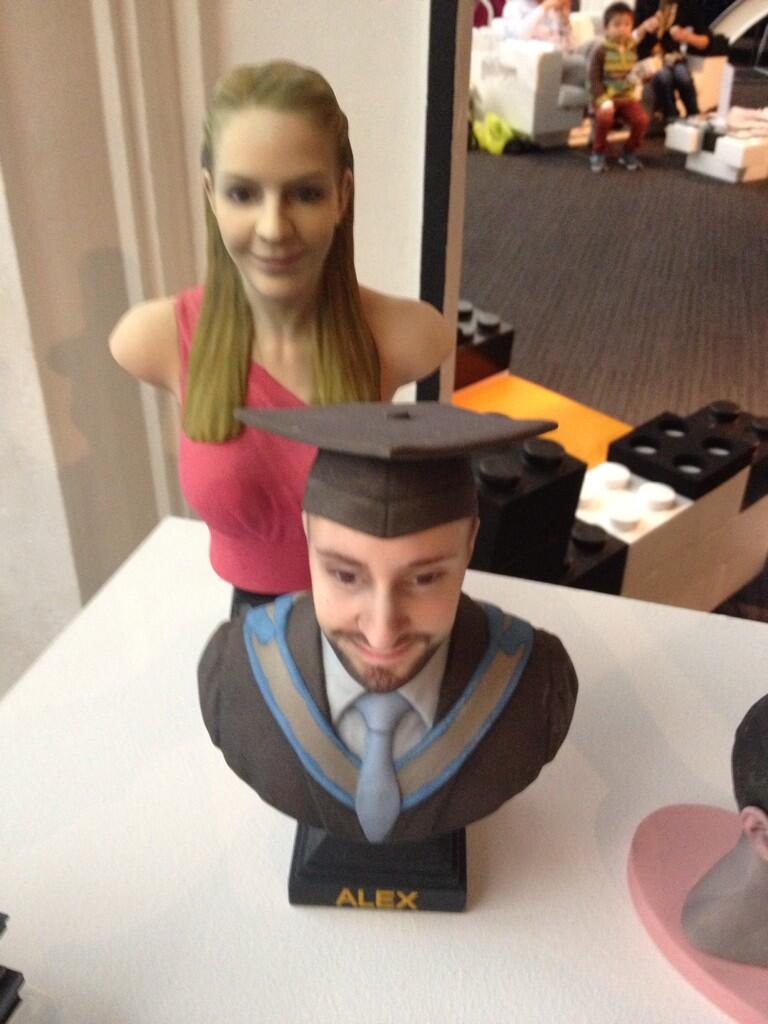
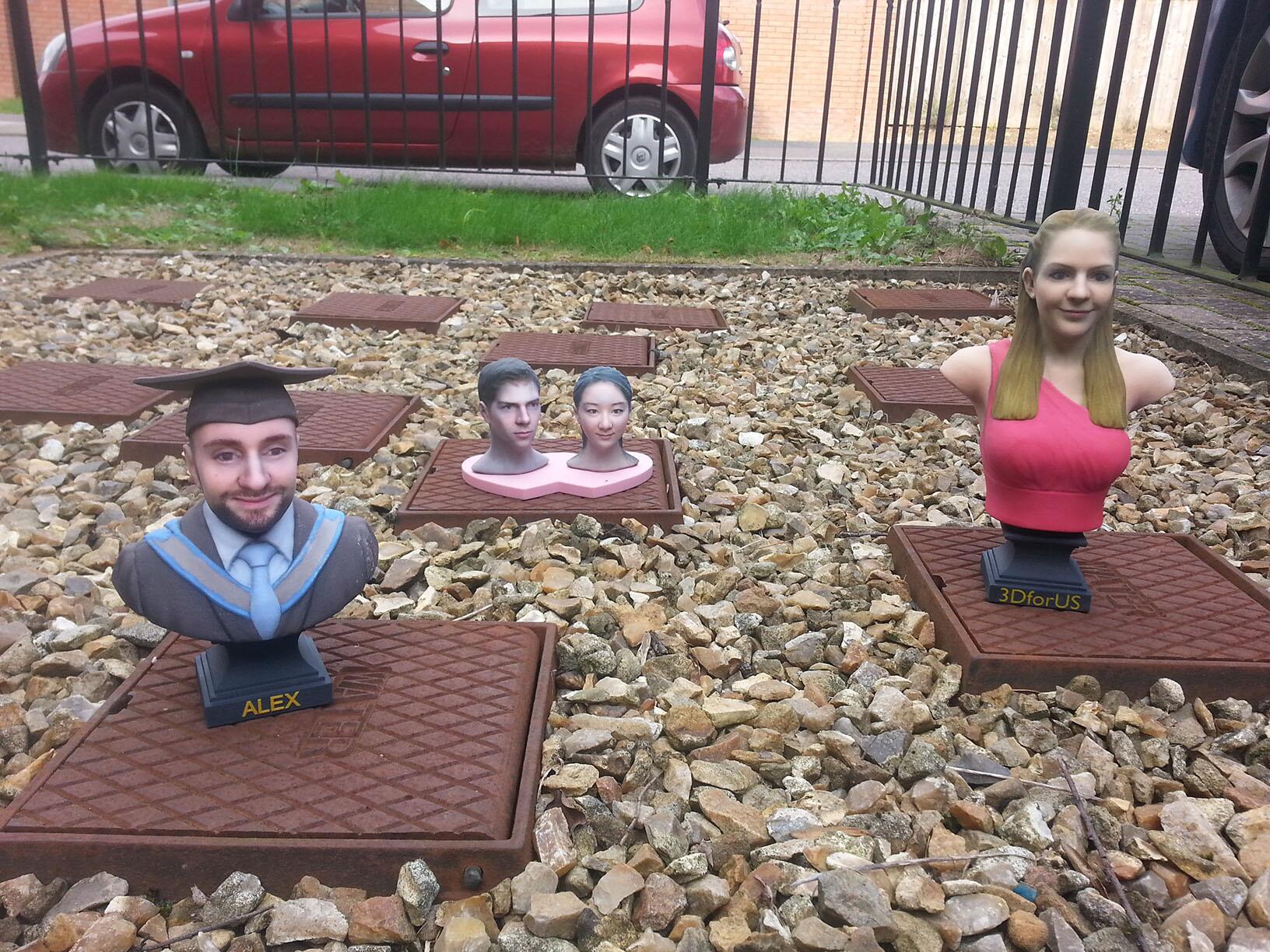
Personalized 3D Printed Busts

A company called 3dforUs is selling these starting at around $270:

This is definitely a cool idea, but my god they're so creepy! Just the stiffness of these figures creeps me out, I don't know. I'm curious how they color these things though, it's very realistic. 

I think they're appealing to the wrong crowd. No graduating teenager would want something like this, and I don't think many parents are on to this sort of thing. I feel like compiling 3D scans of important figures and turning them into sculpture form of this caliber would work better. Hell yeah I'd buy a lifelike bust of Abe Lincoln. 


Thingiverse Picks- stuff that would actually be useful edition!

Often times when discussing 3d printing with people, some question what they'd actually find it useful for. These are people accustomed to having everything designed for them; they simply don't know what it means to create. I'm always pleased to find novel items being added to the Thingiverse and other sites. Here's just a few I personally would find useful:

1.) IPhone Tripod Attachment
And this one even appears as if it works without rubber bands.


2.) IPhone Lifeband 


3.) Cookie Cutters


4.) Caddyrack
5.) Cheating Pencil

6.) Juggernaut

Most useful desk toy ever.


Monday, November 25, 2013

Random Inspiration


New Printers from China

Lots of theft of intellectual property going on here....


Ideaprinter 

Winbo (They didn't if try and hide the fact that it's just a Replicator II)


Obama 3D Printer (Yes, this is a real thing)


Pretty Body Scanner